
Reading Time: 8 minutes
Over the last couple of years, I’ve done a lot of virtual meetings. Mostly interviews, if I’m exact about it. One morning, as I was preparing to join a media platform, I hit peak frustration. I had slowly added about a half dozen virtual meeting apps to my PC and this platform required yet another one. Once I’d completed the interview, I revisited that frustration. It made me think about how information intermediaries, like libraries or government agencies, can lose perspective on the expectations they set for the people they serve.
When you’re a service provider, like a library, you make choices about the services you provide and the tools you use to provide them. In broad cases, we discuss access as a barrier to information. If we provide something that is on the internet, are we creating a barrier to access for people who do not have internet connectivity?
It is not just technology barriers. Lots of information entities are open from Monday to Friday, 9am to 5pm, or thereabouts. Even with online access, resources in these physical places – books in a library, driver’s license exams at a DMV – can only be accessed at a specific location, during a specific time frame. So we create real barriers to access by the choices we make to operate in a certain way or, more likely, due to the costs and laws associated with employing people to support access.
Once we get past the general barriers, though, we may not consider the impact of the details that follow. If we assume someone has internet access, then we may also assume that they can visit our web site. Or we assume that they can participate in our virtual education or meetings or other activities. We may test these subsequent assumptions less, since, once we’ve crossed the internet hurdle … everything’s on the internet.
It’s On the Web
One of the reasons that I think we may not test those assumptions is because of the web browser. It has been some time since you would visit a web page – at least I hope it has been some time – and seen a warning “Best viewed in Internet Explorer 6 or Netscape 5”.

One reason you may not see those warnings any longer is that a lot of the modern web browser technology now shares the same basic code base, Chromium. Or it could be that Google Chrome, also a Chromium-based browser, is so dominant and so the likelihood of alternatives being used is smaller.
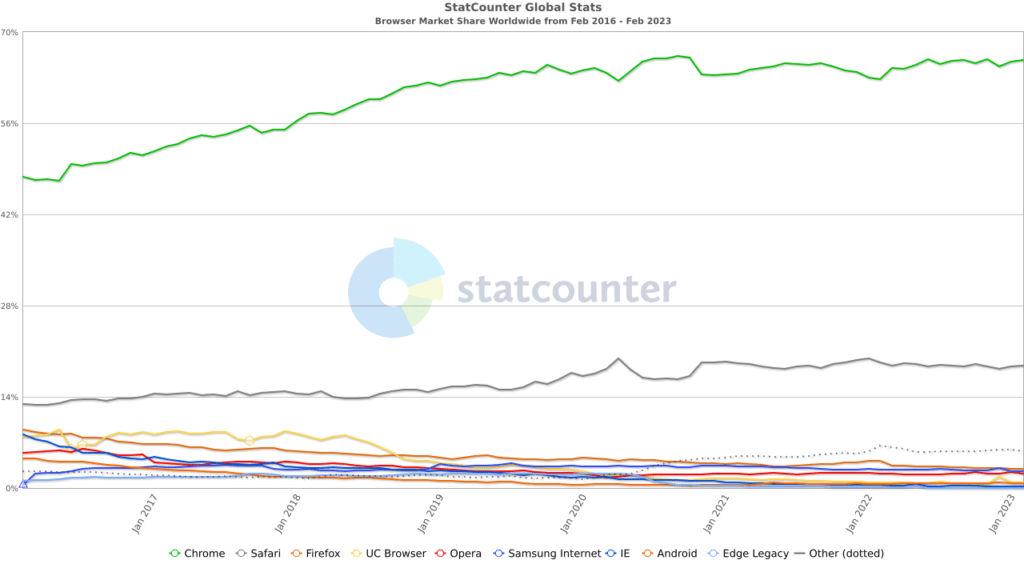
Companies and agencies still hedge their bets, though. You can join a Zoom meeting without a Zoom app but they recommend a Chromium-based browser. I was recently using a corporate web page and needed support because it wasn’t working right. The customer support explained that it could be “due to my web browser“, although I (like many librarians) have multiple browsers and it had errored out on all three of them. The browser wasn’t the issue but technical support may still use it as an obstacle.
The reality is that the sweet spot for web browsers is pretty large now. We can use web analytics to confirm our suspicions on what people use to reach our web resources. But even if we didn’t, we know that the most common web browsers share feature support. So long as our database interfaces or other web design isn’t incompatible, our resources should work for most people.
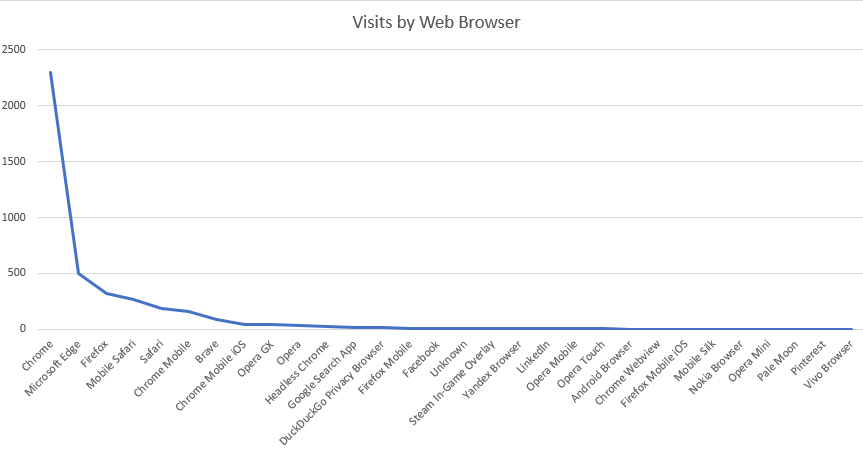
When we create internet-enabled resources, we mostly need to anticipate intermediate issues. If they’re on a mobile device, have we – or the information publishers we are licensing and intermediating – designed an interface to work on smaller screens? Do we require underlying technology, like javascript, to be supported by the device web browser? Like our choices related to web browser, we can make some assumptions because we can tell, from our web analytics, how many of our visitors are on mobile devices or have javascript support, even if they disable it. We can build in error pages too, so that if someone visits our site without a capable web browser or one with features like javascript disabled, we can capture that before we give them a bad user experience.
We’ve Got an App For That
The challenge – and the frustration that kicked off this post – comes when we start to deliver a more customized, curated experience. If it’s on the web and I can use any web browser I want, then one app will work for many resource providers. But what happens when I have to use a specific provider and that provider has its own app?
Virtual meeting software is perhaps the easiest example to work with but you can picture others, I’m sure. At some point in the last 12 months, I’ve had apps installed on mobile or desktop devices for Google Meet, Microsoft Teams, GoTo Meeting, Cisco WebEx, BlueJeans Meetings, and Zoom.
Unlike a web browser, each one of those:
- had username and password requirements (which may have been due to the types of meetings I was having, but I think you need to log in even if your meeting doesn’t require a user-specific login)
- had technical requirements and needed to be updated. Some didn’t interact well with my device firewalls and security
- had different ways of interacting with my microphone and camera, not always taking the default options provided by the device operating system
This meant that each interaction demanded additional overhead. I had to have login information. I had to make sure the app had been updated (and if it hadn’t been, have enough time before I needed to use it to update it). I needed to learn the interface a bit to know how my microphone and camera were set up. I could not accept a meeting at short notice because I might need to install a new app and configure it, rather than just go to a web page.
To be fair to these applications, most of them support web browser-based meetings. I can go to a Teams or Meet or Zoom meeting without an app. The functionality won’t be the same (goodbye virtual backgrounds, for example) but it’s available. But the people asking me to use these applications wanted me to use the apps, because it meant that they knew that we were both using shared technology, the proprietary app, which meant one fewer technical issue they had to worry about.
It’s Not You, It’s Me
I finally arrive at my point: the perspective of the person delivering the service was that they were delivering an app-based experience. The perspective of the person receiving the service was that they needed to use this app for the experience. This app might be one of a half dozen they’ve been asked to use to perform the same task by different providers. But from the perspective of the service provider, we’re only asking them to use one.
It’s strikingly similar to accessibility planning. My organization plans a service. We license a product to deliver that service. We make that licensed product available. We may not consider whether, if it’s not web-based, it creates a new burden on our audience, through multiplication of similar requirements or just added complexity.
I mean, it’s only one app that we’re asking them to install, right? We may not wonder whether it’s the 3d app they need to perform the same function in their life, the 5th interface they need to learn to accomplish their goals. If you regularly flip between Bing and Google web searches, or even commercial search like those in LexisNexis or Westlaw, you’ve experienced some of this.
E-book readers, anyone? I have a public library card for our city library and they use Cloud Library. I have a card for our county public library and they use Overdrive’s Libby. I have my own e-book reader for books that are free or sideloaded. Each one is slightly different and, unlike a book, requires a certain amount of relearning each time they’re used.
Screen brightness is the single biggest challenge for me. One of my ebook reader apps can control brightness by swiping from top to bottom on one side of the screen. But I forget which side and which app, so I inevitably swipe a couple of times after opening an ebook before I realize I’m in the wrong app to use that functionality.
Like virtual meeting apps, ebook providers often have a slightly less functional web interface than their app. The web browser requires them to cede some control or functionality in exchange for universality. Or, in the case of ebooks, perhaps also a slightly less usable interface if you’re not comfortable reading a left-to-right book on the desktop and don’t have a tablet.

At one point, I had access to OverDrive and Cloud Library and O’Reilly Media ebooks in the web browser. And still, the differences between each interface – how to find a title, how to use a title, how to return to where I was when I came back later to a title – created additional friction in the experience. It’s not hard to see why people select an approach, an app or web browser, and prefer to use it for everything they do, even if it excludes useful information or resources.
You can see this on government sites that provide document downloads. PDF? Most browsers will support that now. But how about all of those sites with Microsoft Word documents? Or WordPerfect ones? (This was more common but mostly I only find WordPerfect files converted to PDF, identifiable by their metadata). There’s a universality to PDFs but it doesn’t have to be a baseline. PDFs can be enhanced (and, usually, don’t need Adobe’s reader to read them) and still be universal.
Plan for the Customer
I’ve worked in libraries where talk of thinking about the customer experience is termed dumbing down or planning for the lowest common denominator. Perjorative expressions for making things functional for larger numbers of people. There’s obviously a balance between providing the service you envision and providing a service that can be used. We often make that choice by providing internet-only resources in libraries. Government agencies do the same thing when they shift their services – appointment creation, applications, document uploads, searchable outputs like court judgments – into an online only format.
One question we may want to ask ourselves is whether another web-based resource, with or without an interface challenge, is worth creating. It means ensuring that people can find it, supporting the underlying technology or license fees, and making it as easy to access as possible. As a library or an agency, we’re providing more content or a wider selection of services. But we’d better track the usage and see if the resource draws enough usage to warrant keeping it. Low usage may not be a value judgment so much as a complexity choice. (No, if you build it, they won’t necessarily come.)
My druthers? For the media organizations who want to interview me to all use web-enabled virtual meeting software. Something that I can access and, when my microphone or camera isn’t working properly, can be fixed the same way as the last platform I was on. For libraries with ebook offerings to provide me with a way to use my own ebook reader for all of their ebooks, DRM be damned. For government agencies to publish all of their own web content on public web sites, and not on Facebook or other proprietary, closed-garden sites.
I don’t have a lot of hope, though. I think this sort of universal mindset is hard to create and requires a willingness to not do certain initiatives, to say no. It’s easier to roll out a new service or resource with “it’s just one more app” or “everyone has a phone.”