
Reading Time: 8 minutes
I have been watching some online colleagues in Denmark engage in a massive withdrawal from US-based technology. #DanmarkSkifter It has encouraged me to continue along this path myself. Years ago I started to spread my internet use across web browsers to try to silo some of their knowledge about me. Even though I tend to be adversarial with any web browser, I have been slowly trying to move away from anything Google or Microsoft.
That can be hard when you are in a corporate environment. Our corporate default is Google, so I just ignore it. I can do that because our operating system is Microsoft Windows and the Microsoft app store is enabled. I tend to use Microsoft Edge at work. I have expanded my alternate browser use so that I also have, in addition to Chrome and Edge, I use Mozilla’s Firefox, Brave, and more recently Librewolf and Vivaldi.
Lockdown
The reality is that the browser isn’t really the key problem. It’s the tracking, so the first thing I focus on when I use a web browser is to cauterize the outflow of tracking data. This means that I can only use web browsers that support my key tracking blocking extensions:
- NoScript is the first one. It turns off JavaScript unless you proactively turn it on. Most of the web functions just fine without it and, where it doesn’t, you can toggle on — temporarily or permanently — support for a specific part of a website. Since most tracking seems to be loaded up by JavaScript, this really eliminates the need for a dedicated ad blocking extension. Once you have your primary browser set up, you can export/import the block settings to other browsers to avoid having to re-train each one.
- Electronic Fronter Foundation’s Privacy Badger. This is for trimming around the edges. Sometimes you have to turn on a JavaScript for functionality. I use Privacy Badger to disable any tracking that appears, allowing the functionality without the diminishment of privacy.
- I still load up a copy of gorhill’s UBlock but it’s largely just a belt-and-suspenders tool. Google’s customized take on the Chromium web browser breaks some of the UBlock functionality so I wouldn’t use it by itself.
One big shift among web browsers is to the Chromium base: Google Chrome uses it. So does Microsoft Edge and Vivaldi. It means that any developer’s extension designed for Chrome should work on Edge and Vivaldi as well. In a pretty common “information technology lockdown” approach, our corporate IT has blocked the Google Chrome web store within the corporate network but cannot block the Microsoft extensions store. Also, if you have your web browser profile’s synchronized across desktop devices (home and office, say), the addons will synchronize even if you can’t reach the web store. Blocking extensions is a bit of a mug’s game.
You might not think it would matter but if you spin up a copy of Thunderbeam-Lightbeam and have tracking on, the difference is significant. I showed this to my legal tech students recently. Same web browser, same websites (CNN, National Post, Washington Post, ABA, LexisNexis). First, without any adversarial add-ons, showing all of the third-party tracking and requests going on:
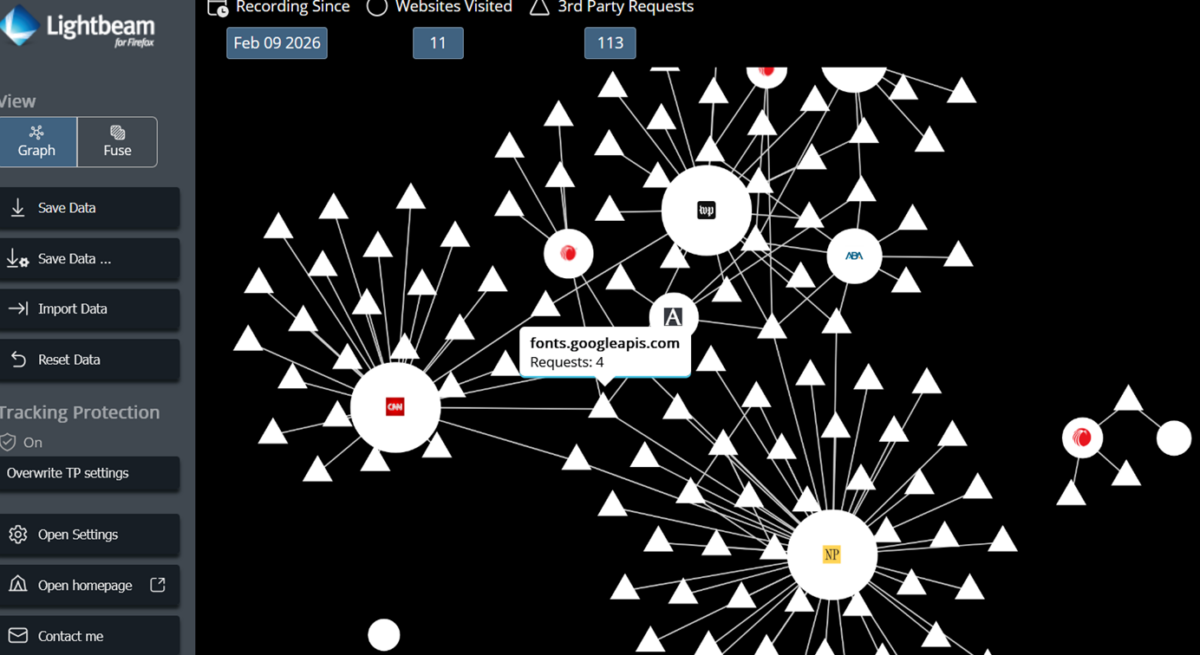
and then with those add-ons, listed above, active:
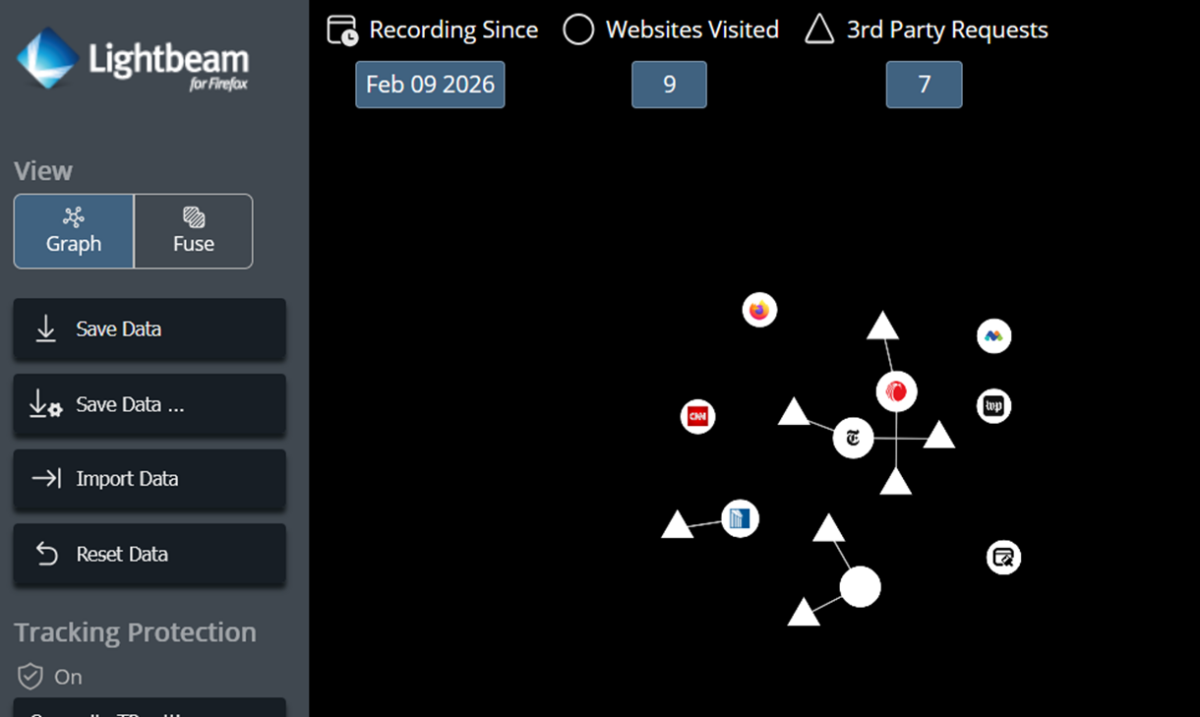
Now I can move among my web browsers with some certainty that I’m not trailing a load of digital exhaust. The one other tweak I make is to the default Google search engine. I try not to use Google but students will use it whether they realize it or not. I taught them this simple hack to add a custom Google search engine so that, if they wanted to, they could see what Google offers them without AI or personalization:
https://google.com/search?q=%s&udm=14&pws=0
The UDM= impacts artificial intelligence results. The PWS impacts personalization. Search engines are pulling IP address to over-ride search keywords to localize results. I’ve tinkered with obfuscation here but the best bet is to flip on a VPN and pop out somewhere else on the internet, geographically, to be certain.
Pick Your Poison
I don’t really mind switching between apps. I find that a custom search is actually far easier than trying a search in different web browsers. The personalization or skewing of results is happening outside of the web browser. So the choice of a particular web browser starts to become one of what other functionality it offers.
Microsoft Edge has been useful because I have a work profile and a personal profile built into the web browser. This means I can toggle between them — or have them both open at the same time — to help me focus on one or the other. State universities don’t want you engaged in personal business at work. I’m also a firm believer that work is 9 to 5 and I do not want my web activity to be tied to work email notifications or other nonsense like that. I already think about work nearly 24/7, I don’t need it available at my finger tips.
Most web browsers support multiple profiles, though, so there’s no reason to use Edge if your only need is alternative profiles. We are also a Microsoft 365 shop, though, and it feels like the integration is better with Edge than it would be with other Chromium-based web browsers, excepting for perhaps Google. But since Google is my last choice for web browsing, Edge has been a good primary choice. I log in to both my Google Workspace and Microsoft 365 (work and personal) accounts on Edge. It’s the one place where I give up the most privacy in order to get the greatest integration.
Although I use Google Workspace for mail and for Drive (and occasionally for Docs when some other academic shares one), I do not log in to any other OAuth-powered Google sign in. My Google and Microsoft accounts are not linked to any other websites unless I cannot avoid it. If there is a choice for an email and a password on a site, even if it supports OAuth, I create a new account.
Brave
I have a copy of Brave installed as well at home and I use it for the sole purpose of accessing YouTube content. For privacy and content reasons, I have turned off my YouTube watch history. The privacy reasons speak for themselves, but they feed into the content reasons: I don’t want YouTube recommending stuff to me. I think we can seek the impact algorithms on sites like X (skew conservative; PDF) or Meta properties have on their users. I can subscribe to channels I want to follow since I’m logged in with my Google account and I can do searches. That is plenty for my very limited openness to video content.
The benefit of Brave is that it combats YouTube advertising. I haven’t seen a YouTube ad in years. Since I proactively block all youtube.com and googlevideo.com URLs on other browsers, I leave the blocking add-ons off Brave. I don’t use Brave’s search or leave YouTube, so I have no non-YouTube history in the browser. Brave is marketed as privacy first but I find them to be sketchy and I’m not a fan of any business running on ad revenue.
Firefox and LibreWolf
They have also introduced an AI component to their browser and I am trying to avoid artificial intelligence under the hood. That’s one reason that I have left Mozilla’s Firefox. For decades, my web browser setup was to use Google Chrome as my primary and Firefox as my alternate. The shift to Microsoft Edge came about only when Microsoft finally dropped its own browser engine — the one that had powered Internet Explorer — and so the extension or add-on functionality was modernized.
But Firefox, as much as it has been a constant companion through my research life, is also headed down the road of AI. The original infusion of artificial intelligence came without much choice on the part of the browser operator. They have started to mitigate that, providing opt-out choices in recent builds. But Mozilla, the Firefox owner, has dumped a lot of resources into its own Mozilla.ai. Their latest CEO says that they’re going to be doubling down on re-building trust but I’m leery. It is too easy to put AI into web browsers and they are too key to how professionals, and professional researchers especially, get their work done. I don’t want my work training LLMs.
Enter LibreWolf. It’s a fork of Mozilla’s Firefox and so it runs the same engine and feels exactly like Firefox. But it is, like Brave, privacy first. It is designed to proactively remove privacy-invading features of Firefox as well as having privacy default settings. This includes turning off DRM and disabling Google “Safe Browsing”, which is a way of running content requests through Google’s systems and capturing browsing habits and IP addresses.
In very short order, LibreWolf replaced Firefox for me. It had become my primary backup web browser until I started playing with Vivaldi. The web browser, not the composer.
Vivaldi
Initially, I had started using Vivaldi because I was unhappy with my webmail app. As I tell my law practice technology students, start with the problem. The problem was that the webmail app, hosted by my web host, was clunky and lacked a lot of functionality. I had started to use an email app on my phone to get around that. But I really wanted a strong, web-based — so I could access it anywhere, not just on a device-based app — email client. When I learned about Vivaldi, I was intrigued.
And put off. Unlike Firefox, Chromium, and LibreWolf, Vivaldi is not open source. It is free and is European, so that gives me some confidence if only because it is subject to European privacy laws. Like it’s fellow Scandinavian originating web browser, Opera, it is Chromium-based like Edge and Google Chrome. This means that it is making similar balances of privacy and Google-centric functionality.
As an email client in a web browser, it is pretty great. It can support a calendar as well as RSS feeds and is a nice little personal information manager (PIM) all on its own. If you’ve got an IMAP or POP3 email account, and can configure SMTP, you’re good to go. The RSS feed function is a bit iffy. I think that it is a good RSS news reader if you don’t have any need to filtering or customization. As someone who generates feeds using XPath, it lacks functionality for me.
I was sick recently, though, and that gave me a lot of time to mope around. This included sitting wrapped up in a blanket at my computer. While I was there, I started to explore Vivaldi more as an alternative to Microsoft Edge. For one thing, as I had learned when I added it to my work computer, Vivaldi is in the Microsoft Store. This meant I could install it without needing admin rights to a PC. Since it was Chromium-based, I could also load in my normal privacy extensions.
The more I played around with it, the more I liked the merger of web browsing and PIM functionality. I will eventually be dumping my Google Mail account and it will be nice to have email in my web browser without using webmail (think Horde, Roundcube, etc.) and having to log in and keep a tab open. Vivaldi’s email function is set and forget.
Many of my web browser tabs are in fact pinned apps: a window with a music player in it, a tab for my password manager, for my note-taking app. Vivaldi’s PIM functionality meant that all of my web-based apps could be in a single web browser. You can pin a tab in Vivaldi just like you can in any other web browser, so I have my default tabs open up on start.
They have done a good job of providing a balance of security under the hood. Unlike LibreWolf, Vivaldi still relies on Google Safebrowsing. But you can toggle it off if you want to. LibreWolf also turns off DNS over HTTPS (DoH, which is unfortunate because of Homer Simpson). But I use a Cloudflare secure DNS that protects against malware in the same way that Safe Browsing does, with a block list, and so I am happy to use DoH and disable Google’s hook. To use this, you change your web browser’s DNS setting to Custom and drop in the URL that works for you:
- Cloudflare DoH blocking malware: https://security.cloudflare-dns.com/dns-query
- Cloudflare DoH blocking malware and adult content: https://family.cloudflare-dns.com/dns-query
You can create multiple profiles like on other browsers and also multiple workspaces, just like on Microsoft Edge (but not on Google Chrome from what I can tell). These are niche. Windows users familiar with Task View, and creating virtual desktops of icons and apps that you can swap between for productivity (instead of having EVERY app open on the same screen at once) will understand the value of workspaces. You can create a set of tabs and put them on a workspace, then toggle to (or mouse wheel scroll) between tab sets.
I’m still determining if this is easier than just having all the apps on one tab bar. I have 10 default pinned tabs but rarely have more than 20 total tabs open. I know some people have dozens of tabs open all the time. I’m not sure I need two or more workspaces but I know some people would probably find them useful for managing their open tabs.
I had started with four web browsers in play: Edge, Firefox, Brave, and very occasionally Chrome. I had shifted to Edge, LibreWolf, Brave, and Chrome. But it looks like the best arrangement for me going forward will be to dump Edge and Chrome, and stick with Vivaldi and LibreWolf. Every other Chromium-based web browser seems to be trying to create an artificial intelligence-powered or -infused version of itself and I am not interested in being part of those experiments. For now, I’ll keep Brave if only to isolate that video traffic. I am also going to start playing with a user-agent switcher (although you can add a custom user-agent within Vivaldi natively) to see if I can get around any “Better with Edge” or “You Must Use Chrome” website developers.