From court activity to legal work
1. Never miss a court development
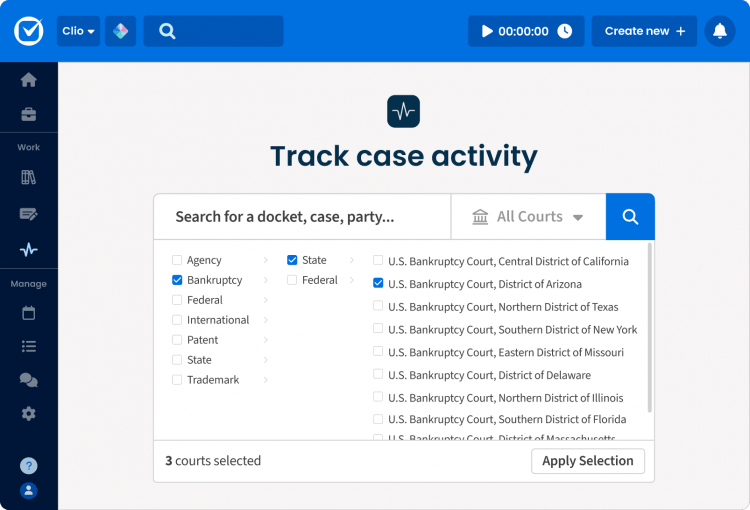
Search for a public court case by party, case number, keyword, or court, then connect it to the corresponding matter in Clio.
From there, Clio Docket monitors the case for new filings, court orders, and scheduling changes. When the court moves, your firm receives an alert tied to the relevant matter, so the team can see what changed and determine what needs attention next.
“I’ve been asking Clio to build this for years. I wake up to an alert that something was filed overnight, and right away I know what matters and what to act on,” said Dmitriy Stadlin, a solo litigator practicing criminal defense and civil rights.

2. Find the filing without the extra work
When a court document is available online, you can retrieve it through Clio Docket and save it directly to the relevant client matter.
Traditionally, lawyers retrieve those same documents through PACER or another court system, where filings are generally purchased on a per-page basis. It’s also common to ask around the firm to see whether someone has already paid for the document before purchasing it again.
Clio Docket works differently.
Once a court document has been purchased and added to Clio Docket’s collection, it can be accessed by other Clio Docket customers without requiring each firm to purchase the same filing again.
That means you’re searching more than 1 billion U.S. court filings through a continually growing collection that expands as new documents become available. Instead of repeatedly paying for the same filings, you can spend less time tracking them down and more time putting them to work.
When you find the filing you need, you can save it directly to the client matter and immediately use it in Clio Work to inform your research, strategy, and drafting.

3. See what changed in the case and decide what to do next
A new filing is only one part of what the docket tells you. The docket also shows how the case has developed, which deadlines or scheduled events may be affected, and what the team may need to address next.
Whether you open the docket proactively or arrive through an alert, you can review the latest development alongside the history of the case and the broader context of the matter.
From there, the work continues in Clio Work. Research the legal issues raised by the development, compare relevant motions, briefs, pleadings, and orders from other proceedings, and use those materials to shape your strategy and drafting.
Instead of treating the alert, the filing, and the resulting legal work as separate steps, the firm can move from seeing what changed to deciding what to do next.
“Clio Docket has saved me three times already. I’ll get an alert that something needs to be filed today, when I only had vague knowledge it even needed to be filed. As a solo, that’s the difference between catching it and not,” said Amanda Simmons, a solo litigator specializing in special education and civil litigation.

4. Keep the matter moving in Clio Manage
Legal work doesn’t end when the research or drafting is complete.
Clio Work connects with Clio Manage, so the work remains tied to the operational life of the matter. Retrieved filings, court activity, deadlines, tasks, communications, documents, time, and billing stay connected to the same client record.
For litigation teams, Clio Manage becomes the operational hub for the matter. New court activity can trigger updated deadlines, follow-up tasks, and next steps without relying on disconnected emails, spreadsheets, or manual updates.
“The more everything integrates, the more it becomes a clean hub of all your relevant facts, matters, billables. You see everything in one place. That just streamlines the time the attorney has to spend on the matter,” said Adam Grant, a solo litigator practicing in LA County probate.
5. Built as a connected legal AI platform
This workflow reflects how Clio is intentionally designed as a legal AI platform.
Rather than separating the systems used to manage matters from the tools used to perform legal work, Clio brings them together around a shared understanding of the client matter.
Court activity discovered through Clio Docket flows naturally into research, strategy, and drafting in Clio Work, while the resulting deadlines, documents, tasks, communications, time, and billing continue in Clio Manage.
The result is continuity. Instead of repeatedly moving information between disconnected tools, your firm’s context moves with the matter, helping you understand what changed, determine what to do next, and carry that work through to resolution.
Built on Docket Alarm
Clio Docket was introduced at ClioCon 2025 as the evolution of Docket Alarm. The latest release brings its court search, document retrieval, and docket monitoring capabilities directly into Clio Work and Clio Manage for eligible solo, small, and midsized firms.
Together with Clio Work and Clio Manage, Clio Docket extends Clio’s connected legal AI platform from managing matters to understanding and acting on what’s happening in court.
Start your free trial of Clio Work today
Clio Docket is one more example of how Clio is expanding what’s possible with a connected legal AI platform.
While Clio Docket helps bring court activity into your workflow, Clio Work helps you turn that information into action through AI-powered research, strategy, and drafting, all grounded in the context of your matters.
Start your free trial to explore how Clio Work helps legal professionals move work forward.
Start your free Clio Work trial.
Practice the future of law today
With Clio Work, you go beyond generic chatbots and use AI that understands the context of your matters and delivers precise, cited legal research, analysis, and drafting that moves your cases forward.